Newsletter
How to Read Audi BCM2 Module with Xhorse Multi Prog No Soldering?
Matched product:
![[UK/EU Ship] Xhorse XDMPG0GL Multi-Prog Multi Prog Programmer ECU Gearbox Programmer Expert Mode Batch Write Chips Free MQB48 License](/upload/pro-sm/26081117864551372585.jpg)
[UK/EU Ship] Xhorse XDMPG0GL Multi-Prog Multi Prog Programmer ECU Gearbox Programmer Expert Mode Batch Write Chips Free MQB48 License
£601
- Item No. SK408
- Free Shipping
1. Xhorse Multi-Prog Programmer ECU Programmer
2. Firmware can be updated yourself by "update kit"
3. Support self-test and smart operation mode
4. Read BMW ISN and NEC, MPC, Infineon etc chip
2. Firmware can be updated yourself by "update kit"
3. Support self-test and smart operation mode
4. Read BMW ISN and NEC, MPC, Infineon etc chip
We need to use Xhorse Audi BCM2 Solder-Free Adapter to work with Multi Prog to read BCM2 all data, and use VVDI2 Key Programmer to calculate BCM2 immo data and save service file, and then write the service file back to BCM2 module with Multi-Prog.
- 1. Read BCM DATA1 with Multi Prog
Connect Multi-Prog Programmer and a computer via USB cable

Open Multi-Prog software
Select Device>> BCM2>> LOCK_BCM2-2 (ADAPTER) (AUDI->AUDI) >> OK >> Detail >> General info/ Connection diagram
We need XDNP62-64-66 Adapters


Follow the connection diagram to connect BCM2 Solder Free Adapter, BCM2 module and Multi Prog Programmer
Power the adapter, and connect Xhorse VVDI2 to the computer

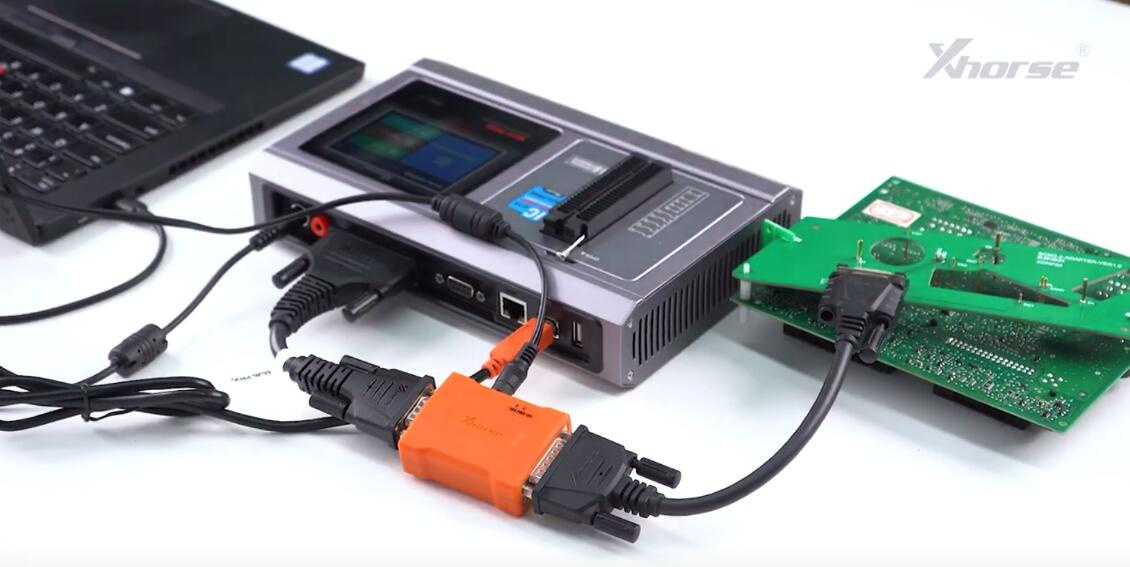

Read DATA1 and save the data file (Read operation takes 22s 47ms

- 2. Show BCM2 Info with VVDI2
Open VVDI2 software, select VW >> Key Learn >> Fifth Immobilizer System-Locked BCM2 version >> Step1: Show BCM2 information >> Load DATA1 file >> Confirm vehicle info


It will show this BCM2 supports to continue Step2 Get BCM2 IMMO data.

- 3. Read BCM DATA2 with Multi-Prog
Read and save DATA2 file. (Read operation takes 18s 833ms)

- 4. Get BCM2 IMMO data with VVDI2 Programmer
Select Step2: Get BCM2 immodata
Load the DATA2 file just saved with Multi Prog Programmer
Xhorse VVDI2 Key Programmer will calculate the immo data of the module
Save the BCM2 immo data. The file can be used to prepare dealer key and learn key.
We also need to save the service data and write it back to BCM2 with Multi-Prog. Otherwise, the module cannot function properly.


- 5. Write service data back to BCM2 module with Multi-Prog
Select SERVICE-DATA/FILE>> Open file >> Load the service data file >> Write
Write chip data successfully (Write operation takes 3 min 35s 650ms)


- 6. Restore BCM2 module to the car, it will work normally.
Done!
Obd2shop.co.uk Team